Moving out of the AWS SES Sandbox
Every new Amazon SES account starts off in the sandbox, a restricted mode that only lets you send to email addresses and domains you have verified yourself. To send real campaigns through Mailblast, you need to request production access from AWS.
Why the sandbox exists
AWS uses the sandbox to keep brand-new senders from damaging the shared sending reputation of Amazon SES. While you are in it:
- You can only send to addresses and domains you have verified
- You are capped at 200 emails per 24 hours and 1 email per second
- You can still create lists, subscribers, templates, and campaigns in Mailblast - you just can't send them
This is fine for testing, but you will hit the cap on your first real send.
Request production access
Open the Request production access page in the AWS console. AWS shows a short single-page form.
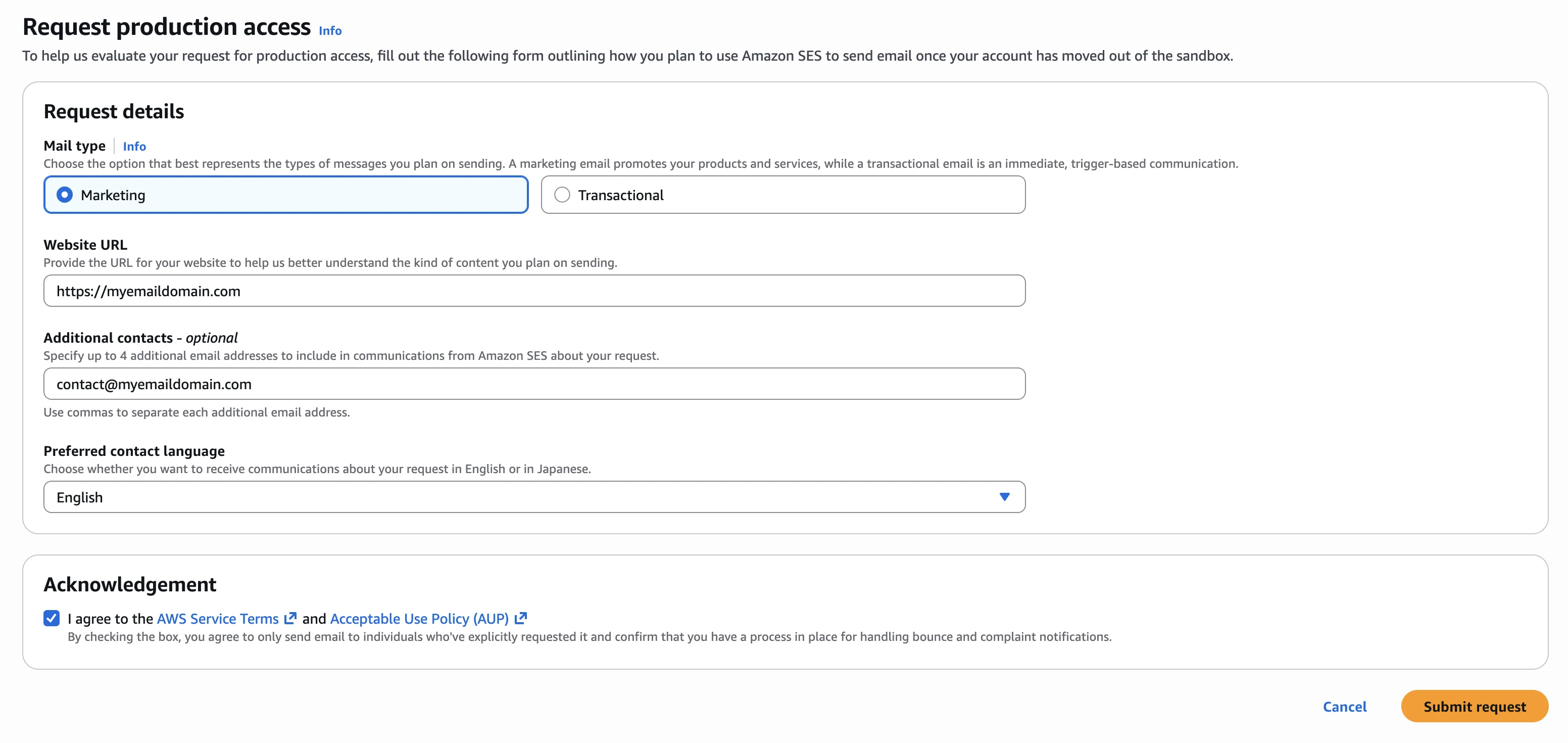
Fill it out as follows.
Mail type
Pick Transactional if you are mainly sending account or order-related emails, or Marketing if you are sending newsletters and promotional campaigns. Most Mailblast users select Marketing.
Website URL
Enter your main website - the same domain you verified earlier. AWS uses this to sanity-check your business.
Additional contacts - optional
Add up to 4 extra email addresses if you want AWS to copy other people on communications about the request. Skip it if the account is just you.
Preferred contact language
Choose English or Japanese - AWS will reply in whichever you pick.
Acknowledgement
Read the AWS Service Terms and Acceptable Use Policy linked on the form - using Mailblast through SES means you are agreeing to them. Tick the acknowledgement and click Submit request.
What happens next
AWS typically responds within 24 hours, sometimes faster. You will get an email at the address on your AWS account when the decision is made.
While you wait, you can:
- Verify additional domains or email addresses
- Build out your subscriber lists, templates, and campaigns in Mailblast
- Send test campaigns to verified email addresses
If AWS denies your request, the rejection email will tell you why - usually because the website is missing or unreachable, or AWS wants more detail about who your subscribers are and how they signed up. Reply on the same support case with the extra detail rather than starting a new request.
Once you are approved, your account is in production mode immediately and you can run a real campaign from Mailblast.